How to Share an HTML File as a Link (So It Opens Rendered)
Paste the HTML into a viewer that hosts it for you, save it, and send the share link. On HTMLViewer.io you sign in with Google, save the document, then copy its link: public for anyone with the URL, or restricted to specific email addresses. Recipients see the rendered page in their browser, with nothing to download.
On this page
If you email someone an .html file, there's a good chance they'll see a download prompt, a wall of code, or nothing at all. The reliable fix is to send a link that opens the page already rendered in their browser. This guide compares the main ways to do that and walks through the fastest one step by step.
Key Takeaways
- HTML attachments often fail: phones and mail apps show code or a download, and security filters are suspicious of them.
- A share link is the most dependable way to send a rendered page. HTMLViewer.io, GitHub Pages and Netlify Drop all produce one; Google Drive does not.
- A public link means anyone with the URL can view it. Use email-restricted sharing for anything sensitive.
- If a link leaks, generate a new one so the old URL stops working.
Why sending an HTML file as an attachment fails
Attachments fail because an .html file is only a web page once a browser opens it, and most of the path between you and your recipient isn't a browser. Here's what typically goes wrong:
- The recipient sees code, not a page. Some mail and file-preview apps display the file as plain text. Your carefully styled report turns into markup.
- Phones make it awkward. On iPhone and Android, an
.htmlattachment usually lands in a preview or "open with" screen. Relative images and stylesheets are gone, and scripts may not run. (Our guide to opening HTML files on iPhone and Android covers the workarounds.) - Security tools distrust HTML attachments. Attackers send HTML files as email attachments to deliver malware, a technique Microsoft describes as HTML smuggling. Corporate filters may quarantine or strip such files, and careful recipients won't open them.
- Multi-file pages break. If the page loads
style.cssorimages/logo.pngfrom a folder next to it, sending only the.htmlfile leaves those references pointing at nothing.
A link sidesteps all four problems. The page is hosted somewhere, the browser loads it like any website, and the recipient only has to tap.
Your options for sharing HTML as a link, compared
The right tool depends on whether you need a quick one-off share, a permanent site, or a code demo. This table summarizes the trade-offs:
| Option | Renders as a web page? | Account needed | Access control | Best for |
|---|---|---|---|---|
| HTMLViewer.io share link | Yes | Google sign-in to save and share (viewers of public links need none) | Public link, or specific email addresses; new link revokes the old one | Single-file pages, reports, AI-generated HTML |
| GitHub Pages | Yes | GitHub account and a repository | Public on the internet, even from a private repo | Ongoing sites, docs, multi-file projects |
| Netlify Drop | Yes | Optional; unclaimed anonymous deploys are temporary | Public URL | Dropping a whole folder quickly |
| Google Drive | No | Google account | Drive sharing permissions | Sending the file itself, not a live page |
| CodePen / JSFiddle | Yes, next to the code | Optional for quick use | Mostly public | Code demos and snippets |
A few details worth knowing about each:
- GitHub Pages publishes HTML, CSS and JavaScript straight from a repository. GitHub's docs warn that Pages sites are publicly available on the internet, even if the repository for the site is private. It's excellent for lasting sites but heavy for a single file you want to send today.
- Netlify Drop lets you drag a folder onto app.netlify.com/drop and get a URL. If you drop without logging in, Netlify's deploy docs say the result is a temporary project you need to claim within an hour. It's the easiest option when your page is a folder with assets.
- Google Drive used to host web pages, but Google deprecated web hosting in Drive and ended it in 2016. Sharing an
.htmlfile from Drive today sends a file, not a working page. - CodePen and JSFiddle render your HTML, but the result sits inside an editor layout built for developers. That's fine for a demo and less so for a client report. See our comparison of online HTML viewers for a closer look.
How to share an HTML file as a link with HTMLViewer.io
HTMLViewer.io turns pasted HTML into a hosted page with a share link in a couple of minutes. There's no file upload, so you copy the code in rather than dragging the file.
- Copy the HTML. Open the
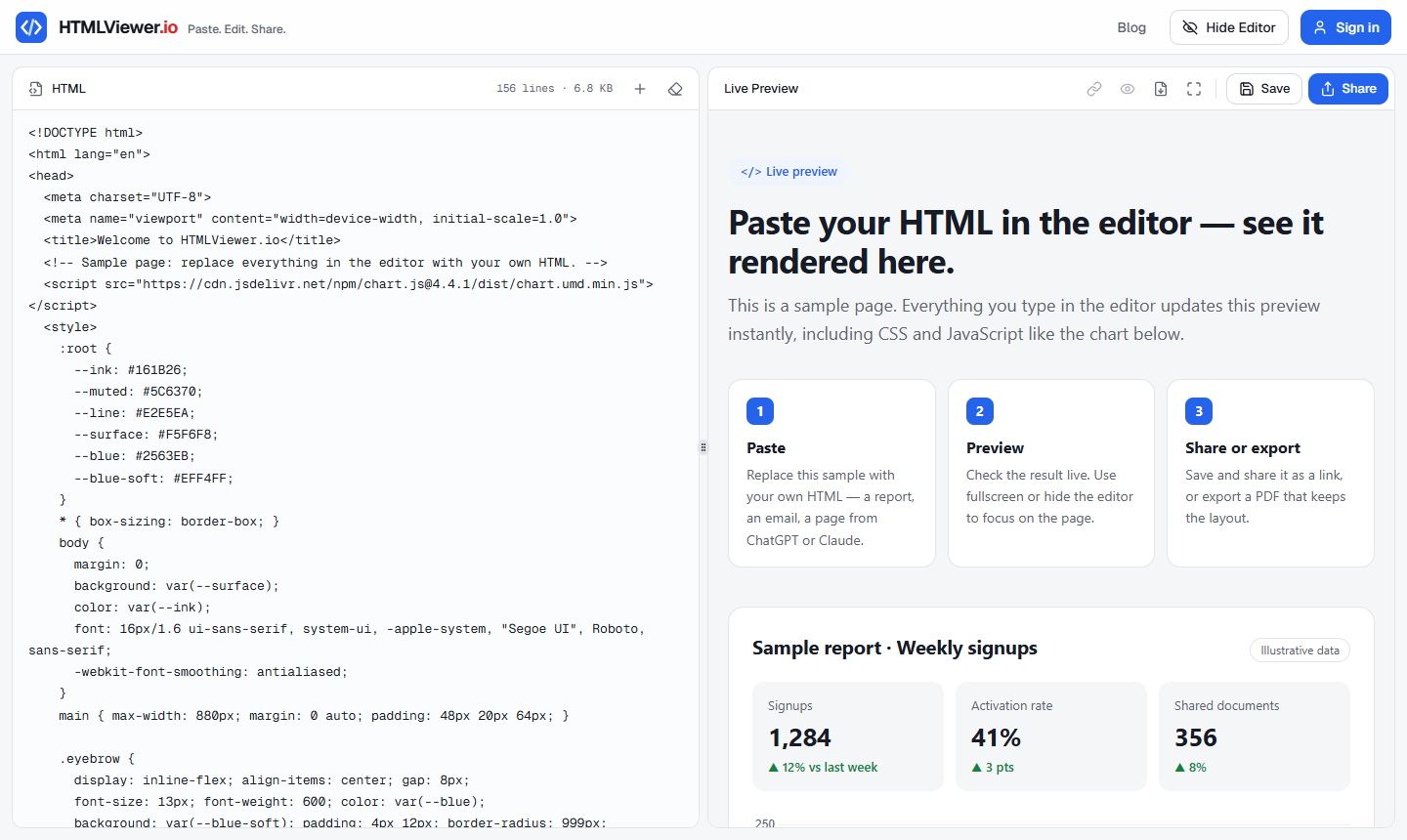
.htmlfile in any text editor (Notepad, TextEdit, VS Code), select all, and copy. If the HTML came from ChatGPT, Claude or Gemini, copy it from the chat's code block. The AI-generated HTML guide covers that case. - Paste it into the editor. Open HTMLViewer.io and paste into the code panel. The live preview renders next to it, including CSS, JavaScript and any libraries loaded from a CDN.
- Check the preview. Make sure charts render and nothing is missing. If images or styles are absent, the file probably references local files (see the next section).
- Sign in and save. Sign in with Google, then click Save. Saving and sharing require an account; previewing does not.
- Choose who can see it. Click Share and pick Public for everyone, or add the specific email addresses that should have access.
- Copy and send the link. Use Copy share link and paste it into email, Slack or a chat. The link looks like
https://htmlviewer.io/share/<token>.
What your recipient sees
Recipients see the rendered page at full width with a small header showing the title, date and a Public or Private badge. The header has Copy link, Fullscreen and Export PDF buttons and shrinks as they scroll, so the page itself stays front and center. It works on phones too.
If they need a file for their records, they can export a PDF from that header. Our guide to converting HTML to PDF explains the two PDF modes.
Make your HTML work as a single file first
A share link can only show what's in the HTML you pasted. Anything the page loads from your own computer won't come along. Before sharing, check for these patterns:
<!-- Breaks when shared: points at files on your machine -->
<link rel="stylesheet" href="styles.css">
<img src="images/chart.png">

<!-- Works when shared: inline or loaded from a public URL -->
<style>
  body { font-family: system-ui, sans-serif; }
</style>
<img src="https://example.com/chart.png" alt="Sales chart">
<script src="https://cdn.jsdelivr.net/npm/chart.js"></script>
Fixes, in order of effort:
- Inline your CSS by moving the contents of
styles.cssinto a<style>tag. - Load libraries from a CDN (Chart.js, Bootstrap and similar) instead of local copies.
- Host images publicly or embed small ones as data URIs. Keep in mind that each saved HTMLViewer.io document is limited to 5 MB, so large embedded images add up fast.
If your page is genuinely a multi-page site with many assets, Netlify Drop or GitHub Pages is the better fit. For data reports and dashboards exported from Jupyter, Plotly or Quarto, sharing an HTML report without hosting covers the export settings that make them self-contained.
Privacy: who can see your shared link?
A public link can be opened by anyone who has the URL, so share it the way you'd share the document itself. There's no password on it. Once it's pasted into a group chat or forwarded, you can't control where it goes.
Use these rules of thumb:
| Content | Recommended sharing |
|---|---|
| Portfolio page, demo, public announcement | Public link |
| Client proposal, internal report, pricing | Private, shared with specific email addresses |
| Personal data, credentials, anything regulated | Don't put it in a shared web page at all |
Email-restricted sharing is the safer choice for sensitive documents. Recipients have to sign in with Google using the invited address before the page opens. If you invite someone who hasn't used HTMLViewer.io yet, they show as Pending until they sign up.
To cut off access, create a new link for the document with the refresh icon in the share settings. The old URL stops working, and you send the new one only to the people who should keep access.
What HTMLViewer.io doesn't offer: password-protected links, expiring links or view analytics. If you need those, a hosting platform with access controls, or a document tool built for data rooms, is the right choice.
Which option should you pick?
Pick based on what you're sending and who's receiving it:
- One HTML file for a client, boss or classmate: HTMLViewer.io. Paste, save, share, done, with email restriction if needed.
- A folder with CSS, JS and images: Netlify Drop for a quick throwaway link, GitHub Pages for something permanent.
- A code snippet you want others to fork: CodePen or JSFiddle.
- An HTML email template: send a test email instead, since email clients render differently from browsers. See previewing HTML email templates.
If you only need to look at a file yourself without sharing it, viewing an HTML file online is simpler still: paste it and read the preview, no account required.
Frequently asked questions
Can I just email an HTML file instead of sending a link?
You can, but the recipient has to download it and open it in a browser, and many mail clients and phones show it as a download or as raw code. Security filters may also flag HTML attachments because attackers use them for phishing. A link avoids all of that.
Does Google Drive render HTML files as web pages?
No. Google turned off Drive's web hosting in 2016, so a shared .html file on Drive downloads or shows as a file preview instead of running as a web page.
Who can open a public HTMLViewer.io share link?
Anyone who has the URL. It isn't password protected, so treat a public link like the document itself and switch to email-restricted sharing for anything sensitive.
How do I stop someone from viewing a link I already sent?
On HTMLViewer.io, create a new link for the document. The old URL stops working, and you send the new one only to the people who should still have access.
Do recipients need an account to view a shared HTML page?
Not for a public link. For a private link shared with specific emails, recipients sign in with Google using the invited address before the page opens.
Paste your HTML and see it rendered in seconds — free, no sign-up needed to preview.
Open HTML Viewer